Release notes

This is where I write down everything I change in Cleo Track: the big features and the small fixes. I update it whenever I ship something.

August 7, 2026

Weekly roundup
Cleo TrackNew

See when your baby actually feeds

Everyone tells you a rhythm will show up eventually. Insights now has a two-week map of your feeding times, half hour by half hour, so you can see whether yours has arrived yet.

Here's everything that landed in Cleo Track this week.
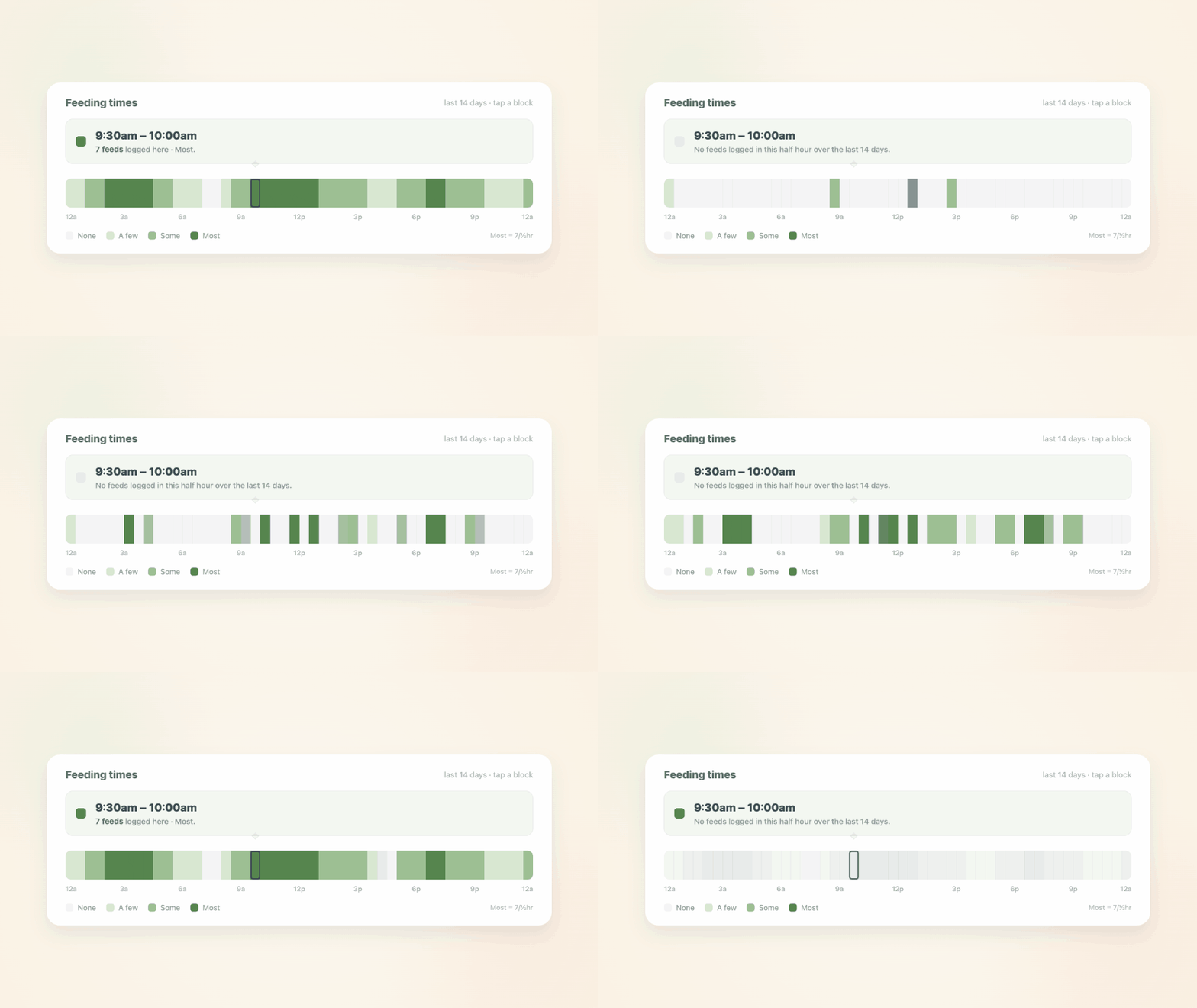
The Insights feeding heatmap filling in, half hour by half hour across the day, with the busiest blocks darkest

Feeding times

The feeding chart in Insights is swipeable, and there's a third view now. The first two show amount per day and feeds per day. The new one is a map of the last two weeks, split into half hour blocks, with the busiest times darkest. Tap any block to see how many feeds landed there.

What it's good for is the question you can't answer by scrolling the timeline: not "when did she eat today" but "does she always want something around 4am, or did it just feel that way." Two weeks is enough to tell the difference between a pattern and a rough couple of nights.

If your days still look scattered, that's worth seeing too. Every baby is different, and plenty of them take months to settle into anything that looks like a schedule.

Improved

  • Feeding: the voice button now sits above the tab bar instead of covering it, so the bottom row of buttons is reachable again. On the timeline it takes the place of the add button, and tapping a time on the day rail or a quick-log card on Home both still work for logging by hand.
  • Chat: family chat has a back button. It's a tab rather than a screen you push, so there was nothing to swipe back to, and the keyboard sat over the tab bar. The back control returns you where you were and dismisses the keyboard.
  • Reminders: notifications can carry an image now, animated ones included.

Fixed

  • Sleep: starting a sleep could fail every time for one child, with no way to clear it. If a running session was deleted before it ended, the deleted row kept holding that child's "one active sleep" slot behind the scenes, so every later start was refused against a session you couldn't see. The same applied to nursing and pumping. Your entries were never affected, and this is fixed for everyone without anything to do on your end.
  • Sharing: on a caregiver link, a save that got rejected used to close the sheet as though it had worked. It now tells you what happened and keeps the entry in front of you.

Scott

Permalink →


July 31, 2026

Weekly roundup
Cleo TrackNew

A place to talk, right in Cleo Track

Cleo Track now has family chat: one shared conversation for everyone in your family. If you've ever texted "did she already eat?" from two rooms away, this is that conversation, sitting next to the entries it's about.

Here's everything that landed in Cleo Track this week.

Two caregivers handing off the evening in a shared Cleo Track family chat

Family chat

Every family in Cleo Track now has one shared conversation, and everyone with a Cleo login is already in it. There's nothing to set up.

Messages show up as they're sent, so you're not refreshing to see whether your partner answered. Small faces sit under the last message each person has read, which quietly settles the "did you see that?" question without anyone having to ask it. If a message goes unread for a few minutes, Cleo sends a gentle nudge, once, not a stream of pings.

The reason it lives here rather than in your texts is context. "Did she already eat?" is a question about an entry that's a few inches away on the same screen, and the answer usually is too.

A join code instead of an email invite

Adding someone to your family used to mean sending an email invite and hoping it survived their spam filter. Now you get a short code you can share however you already talk to them: text, a chat, or reading it out loud across the kitchen.

Fixed

  • Sync: edits that clear a value, like removing a note or wiping an amount, now save properly. Before this, clearing a field looked like it worked on your device but silently never made it anywhere else, so the old value came back later.
  • Medicine: doses now read as 2.5 instead of 2.50.
  • Onboarding: signing in no longer shows the add-child screen when you already have a child.
  • Feeding: deleting an open bottle no longer leaves a phantom "active" bottle behind.
  • Accessibility: text on sage green buttons is darker now, which makes it readable in more lighting than before.
  • Cleo+: notification settings and plan wording now reflect your own family's plan instead of a generic version.

Scott

Permalink →

July 24, 2026

Weekly roundup
Cleo TrackNew

Cleo Track, now on iPad

Cleo Track runs on iPad now, in both portrait and landscape. I also rebuilt how entries sync across your devices, so nothing gets lost between phone, iPad, and Watch, and notifications finally live in one place.

Here's everything that landed in Cleo Track this week.

Cleo Track expanding from a phone to a landscape iPad

Cleo Track, now on iPad

Cleo Track runs on iPad now, in both portrait and landscape. Log a feeding, check the timeline, or look back at the week on the bigger screen, whenever that's the one within reach.

Nothing gets lost anymore

I rebuilt how entries sync across your devices. Deletions now propagate properly instead of quietly reappearing, or vanishing only on the phone you deleted them from. A partner's device notices new activity within seconds instead of waiting for the next time it happens to refresh. And the Apple Watch logging path is far more trustworthy: a log you make there now tells you honestly whether it saved, is queued, or failed, instead of silently disappearing. Timestamps are also now stamped by the server instead of your phone's clock, so two co-parents logging from different devices, especially with any clock drift between them, can't quietly drop each other's entries anymore.

Improved

  • Notifications: the bell icon now gathers everything in one feed: your family's activity, any tips or announcements from me, and a quick note when your child has AI cleanup suggestions waiting. No more checking three different places to see what's new.
  • Feeding: when you open a bottle, you can set what time it was actually opened instead of it always defaulting to right now.

Scott

Permalink →

July 17, 2026

Weekly roundup
Cleo TrackNew

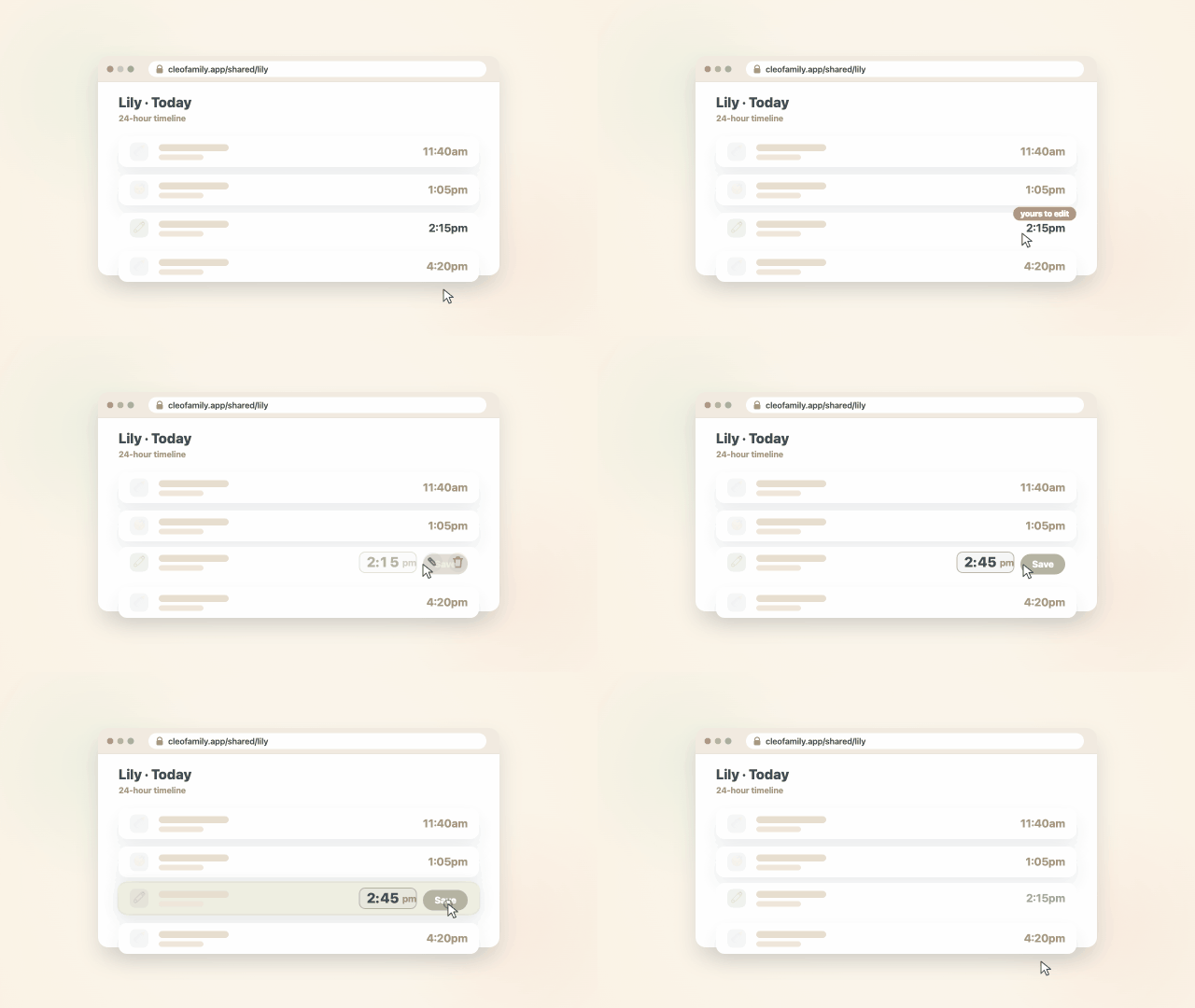
Caregivers can now fix what they logged

A shared caregiver timeline with an entry being edited

If you've shared a caregiver link with a babysitter or grandparent, they can now edit or delete the entries they personally logged through it, not just add new ones. I also redesigned voice logging to be simpler and more reliable, brought the exact-amount bottle picker everywhere, and forgotten bottles now close themselves.

Here's everything that landed in Cleo Track this week.

Caregivers can now fix what they logged

If you've shared a caregiver link with a babysitter, daycare, or grandparent, they've always been able to log entries through it. Now they can edit or delete the ones they logged themselves too, so a quick correction, the wrong time, a typo in the notes, doesn't have to wait for you. A small marker shows which entries are theirs to change.

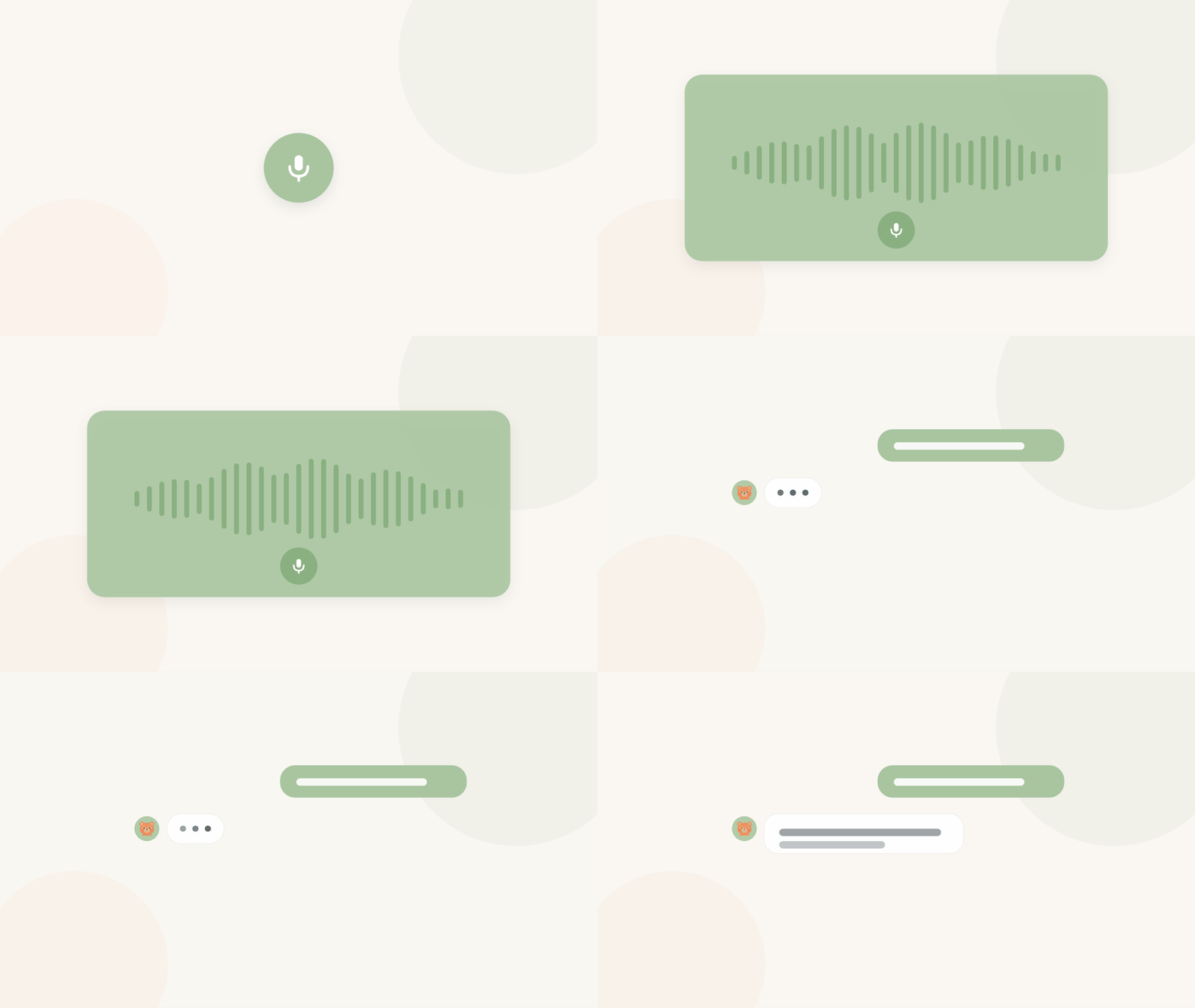
Voice logging, redesigned to be simpler and more reliable

Hold the button, say what happened, even a few things at once, like "4oz bottle and a wet diaper," and Cleo shows you the entries it heard underneath. Look them over, accept or reject each one, and only then does anything get saved. It's iOS only for now.

Feeding, exact and consistent everywhere

The tap-to-edit ounce picker rolled out to every log form, feeding, multi-add, and the caregiver view, so you're never stuck with a fixed row of preset amounts. You can also now correct a bottle's contents (breast milk or formula) after you've started it, on web or iOS. And logging a feed without saying an amount now defaults to whatever you used last for that child, the same way everywhere you log.

Forgotten bottles close themselves

A bottle left open more than four hours, the classic forgotten log, now closes itself in the background, so it stops showing a runaway timer and stops blocking you from starting a new one.

Improved

  • Sharing: managing a caregiver link on iOS is simpler now. Tap the link to edit it, and revoking it lives right there in the same sheet instead of a hidden swipe gesture.
  • Feeding: the caregiver bottle view now shows in-progress sessions correctly as one entry with its sips grouped underneath, instead of scattering them.
  • Notifications: "stay in the loop" pushes got more variety and warmth. A silent bug had them falling back to the same generic line every time.
  • Timeline: grouped entries now collapse into a tidy stacked-icon summary you tap to expand, instead of growing into a tall card.
  • Web: every log form now opens as a full-screen sheet instead of a small centered popup, so nothing gets clipped on a short screen.
  • Design: tightened up colors, casing, and the wordmark to match the Cleo look more consistently across web and iOS.
  • Removed the dashboard's "let's get caught up" banner. It's redundant now that notifications already surface what other caregivers logged.

Fixed

  • Onboarding: adding a child during signup could silently fail to sync, leaving a new family unable to log anything with no error shown. Fixed, and a failure like this can't hide silently again.
  • Settings: turning off AI cleanup suggestions for a kid could quietly get flipped back on by another device. It sticks now.
  • Sleep: ending a sleep session from the Lock Screen Live Activity could silently fail to save if your session had expired. Fixed.
  • Growth: entering a child's birthday in the evening could save the wrong calendar day depending on your time zone. Fixed, including the one record it affected.
  • Timeline: the Timeline/List toggle was invisible if your phone's system setting was dark mode. Fixed.
  • Feeding: the bottle-logging sheet popped the keyboard open over the amount buttons the moment it opened. It only shows up now if you tap the amount field.

Scott

Permalink →

July 10, 2026

Weekly roundup
Cleo TrackNew

Cleo closes your forgotten timers, and your Watch catches up

If a sleep or pumping timer has ever run all night because you forgot to end it, that's handled automatically now. And Apple Watch logging finally does everything the phone does, including two new watch face shortcuts.

Here's everything that landed in Cleo Track this week.

Forgotten timers close themselves

A sleep, nursing, pumping, or tummy time session left running way past when it should have ended (asleep for 16 hours, or 2 hours into a feed) now closes on its own, with an end time estimated from that child's recent history. It's flagged with an "Auto-closed" badge right on the timeline, and every one gets a one-tap "Looks right" confirm the next time you open it, so you can fix it if the guess is off. Auto-closed entries stay out of your stats and doctor visit summary until you've looked at them. Nothing is deleted or hidden, and if two devices both started a session for the same child, the extra one now resolves itself instead of getting stuck.

Apple Watch catches up to the phone

The Watch app can now log tummy time and bath, the two quick-log types it was missing. Its quick-log grid also finally follows the same items and order you set up on the phone, instead of showing a fixed list. Bottle amounts respect your child's size preset now too, so families on the bigger preset aren't capped at 4 oz. And there are two new watch face complications: a last-feed glance and a one-tap diaper launcher, alongside the sleep timer.

Improved

  • Feeding: Logging a new feed now defaults the amount to what's left in an open bottle, or your last feed amount, instead of a flat 2 oz.
  • Reminders: Notifications read a little more like a person wrote them now, and fold in the note you left on an entry. Tapping one opens the app directly instead of bouncing through the browser first.
  • Notifications: Tapping an entry from a notification or an overnight review suggestion now opens the same rich entry row you see in the timeline, and you can edit it right there.
  • Chat: Now labeled as a beta feature with a quick link to send feedback, since it's still early.

Fixed

  • Sleep: The Live Activity "End" button now registers instantly. A rapid double-tap no longer triggers a false "sleep not logged" alert; that sleep was always saved correctly.
  • Sync: Fixed a bug where a duplicate open-bottle, sleep, nursing, or pumping entry from two devices logging at once could get a device's sync stuck. These now resolve automatically, and if a log genuinely can't be saved, you'll hear about it instead of it disappearing quietly.
  • Family: Caregiver profile photos weren't showing up for some accounts. They display correctly now.
  • Overnight review: Entries were compared across two lists in different timezones, which could produce a "double-check this" suggestion for an entry that was actually logged correctly. Your data was always right, only that comparison was off.
  • Chat: Opening Chat now scrolls straight to your most recent message instead of the oldest one.

Scott

Permalink →

July 3, 2026

Weekly roundup
Cleo TrackNew

Cleo now lets you know when something's logged

You told Cleo you want to stay in the loop. Now it actually taps you on the shoulder, with a notification center and a push alert when someone else logs an entry, plus a pause button for when you need quiet. I also rebuilt Chat, now in beta, so you can talk or type to Cleo right from Track.

Here's everything that landed in Cleo Track over the last two weeks.

The new notification center in Cleo Track

Stay in the loop

If your partner logs a feeding while you're out, or a caregiver checks in on a diaper change, you can now actually know about it. Turn on "Stay in the loop" in Settings and you'll get a push notification, batched into one summary if a few things happen close together so your phone doesn't buzz for every single entry. Everything also lands in a new notification center (the bell icon), so you can catch up later even if you missed the push.

Need quiet instead? A pause button lets you turn notifications off for a few hours, the rest of the day, the rest of the week, or a custom stretch, with no need to remember to turn it back on.

Talking to Cleo from the new Chat tab in Track

Chat: talk or type to Cleo (beta)

There's a new Chat tab, in beta for now. Type or talk, the same way you'd text a friend: "log a 4oz bottle," "when did she last nap?" It's the same assistant behind Text Cleo and the Cleo Voice app, so it remembers your conversation, shows quick action buttons for what it did, and asks you to confirm before anything gets deleted. Since it's still in beta, expect it to keep getting better, and tell me when something feels off.

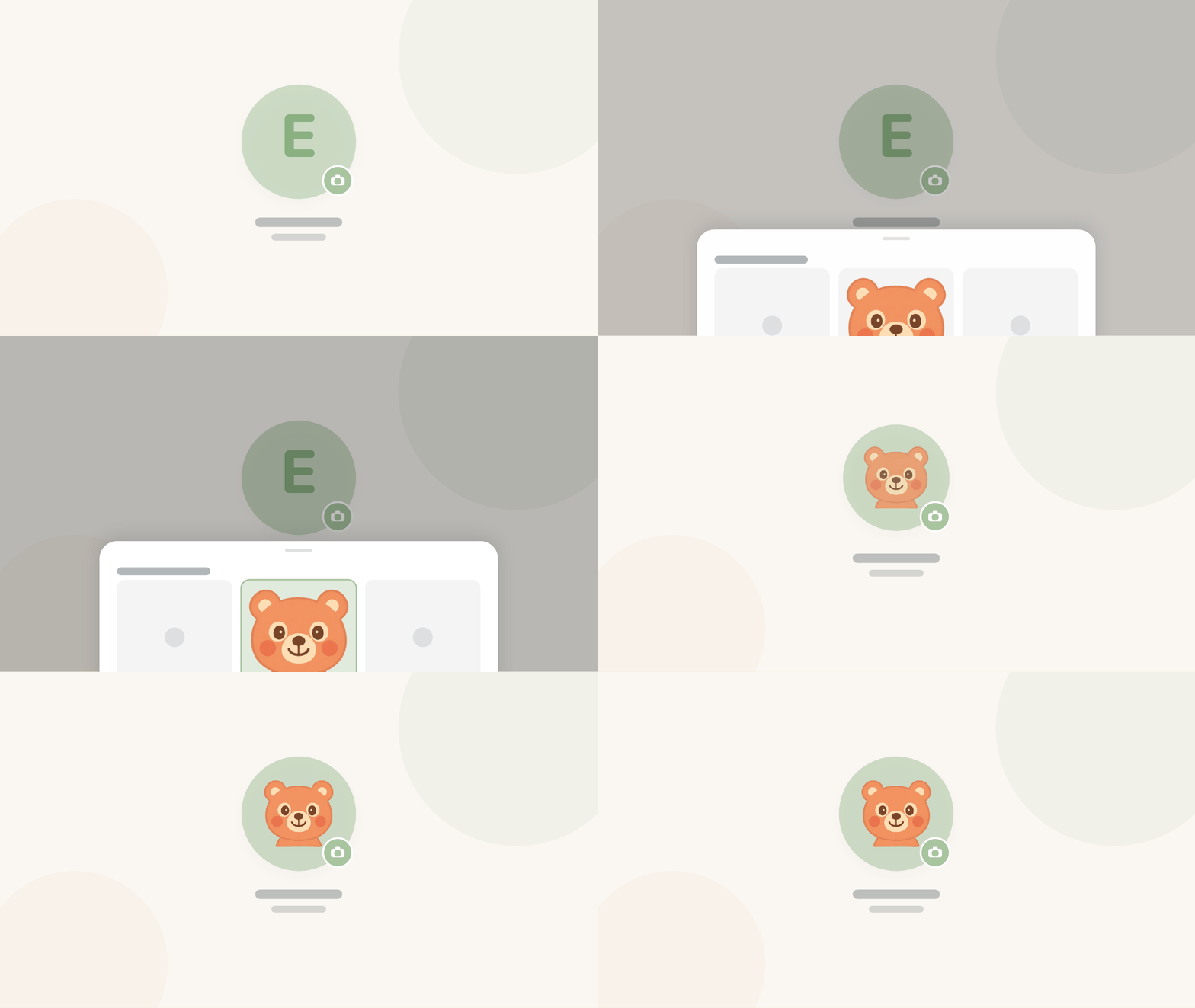
Adding a profile photo to a child in Cleo Track

A photo for every face

Kids and caregivers can now show a real photo instead of just initials, wherever they show up in the app. Set one once, from Account or a child's settings, and it follows that person across Cleo. Initials are still there as a fallback if you skip it.

Insights and reports now match your time zone

If you ever noticed your insights graphs didn't quite match what you remembered about a day, this was probably why. The graphs and the pediatrician report were bucketing entries by UTC instead of your family's local time. If you're in Chicago and logged a bottle at 10pm, it now shows up on that night's column, not the next morning. The daily recap follows the same rule.

Improved

  • Watch: logging now goes straight to the server with its own offline queue, so a tap saves instantly even if your phone is asleep or out of range.
  • Cleanup: AI cleanup suggestions now show the entry right there on the review page, with one tap to apply the fix, delete it, or add what's missing.
  • Insights: the Doctor tab is now Insights, with the pediatrician summary as its own view alongside it.
  • Sleep: the wake-up buttons on your Lock Screen now confirm instantly instead of waiting on the network. Sleep logging on iOS also gained a notes field, matching what was already on web, useful for a nap in the car or a wake-up worth remembering.
  • Daily recap: the nutrition section now looks at the past week as a whole, whether things are trending, holding steady, or a day looks like a meal got missed. More story, less list.
  • Settings: the desktop sidebar can now collapse down to icons for more room.
  • Billing: the upgrade button now shows a real error if something goes wrong, rather than quietly doing nothing.
  • Icons: the bottle, diaper, and growth icons on the web app now match what iOS uses for the same entry types.

Fixed

  • Sharing: caregiver links set to "never expires" couldn't log anything at all. Fixed, and the caregiver page now works on much older phones too, with a simple fallback form if the regular page can't load.
  • Notifications: some accounts weren't getting "stay in the loop" pushes at all, silently. That's fixed, and it can't fail silently again.
  • Timeline: an entry with a missing or odd time value could crash the whole timeline. It now just shows a dash instead.
  • Settings: the birthday field overflowed its card on some phones, and the bottle icon in the timeline rendered oversized. Both are sized correctly now.
  • Auth: fixed a bug where navigating quickly right after a page load could sign you out. Your data was always safe; only the session handling misbehaved.
  • Auth: fixed the password-reset screen showing the full app navigation. It now opens as a clean, focused page like the sign-in screen.

Scott

Permalink →

June 19, 2026

Weekly roundup
Cleo TrackNew

Cleo now checks your logs overnight

If you've ever wondered whether yesterday's entries look right, I built something to do that for you. A new overnight review flags anything that looks like a data mistake or a gap worth a second look.

Here's everything that landed in Cleo Track this week.

Overnight entry review

Every morning, Cleo quietly reviews the previous day's entries against the last eight days of patterns. If something looks off -- a gap longer than usual, an amount that seems like a unit mix-up, a stretch of logging that doesn't quite add up -- it surfaces it as a suggestion. You can tap through to see what it caught, dismiss it, or go fix the entry directly.

It's off by default for each child and available only on Cleo+. There's an "Analyze now" button in each child's settings if you'd rather run it on demand.

Nothing is changed automatically. It's a second pair of eyes, not an autocorrect.

Settings, reorganized

The settings page used to be one long scroll. It's now a navigation index: Account, Children, Family, Plan, and Notifications each live on their own page with a deep-linkable URL. Per-child settings got the same treatment, with Quick Log, Sharing, and Caregiver Links on their own subpages.

Your timezone is here now too. It auto-detects when you sign up and is editable anytime in Account settings.

Improved

  • Daily digest: The email notification is now one toggle instead of a master switch plus a sub-toggle. If you had it on, it's still on.
  • Feeding (iOS): The bottle amount stepper now matches your bottle size preset, so fewer taps to reach the right number.

Fixed

  • Sign-in: Some accounts were hitting a "too many requests" error at sign-in because a stale auth cookie was retrying in a loop. The root cause is patched. If you saw this error, it should be gone. Nothing you logged was affected.
  • Family (iOS): Fixed "Failed to fetch family" for some users with extra-precise database timestamps. Family members load correctly now.

Scott

Permalink →
Cleo TrackNew

Nursing and pumping land in Track

Logging a nursing session in Cleo Track

Feeding isn't only bottles. You can now track nursing and pumping right alongside everything else, and a stack of smaller fixes makes the everyday smoother.

Here's everything that landed in Cleo Track this week.

Nursing and pumping

Start a nursing session and note the side, or log a pumping session with the amount, the same easy way you log a bottle. It all lands in the same timeline and the same daily summary, so the full feeding picture stays in one place instead of in your head.

Improved

  • Logging: The quick time picker is now a single swipeable row, so setting a time is one motion.
  • Watch: The watch home screen has a cleaner grid layout, with the kid right in the header.
  • Sleep: You can mark a wake-up straight from the sleep Live Activity.
  • Feeding: An open bottle's end time now follows your last sip instead of when you closed it, so the timing reads true.

Fixed

  • Timeline: Filters no longer hide sparse entries, and the list keeps loading as you scroll.
  • Sync: I tracked down some quiet save failures so entries land every time. Nothing you logged was lost, this just makes sure it always reaches your other devices.
  • Watch: Tapping the watch widget now opens the sleep timer instead of the main page.

Scott

Permalink →

May 29, 2026

Weekly roundup
Cleo TrackNew

Open bottle tracking

If you've ever stood at the counter wondering whether a bottle is still good, this one's for you. Cleo now follows a bottle from the moment you open it, so you don't have to keep that math in your head.

Open a bottle once, then log each sip against it through the day. Cleo keeps track of how much is left and how long it's been open, so at 2pm you're not guessing whether the morning bottle is still okay.

Improved

  • Feeding: The bottle card shows time open and amount left at a glance, without tapping in.
  • Watch: You can log a sip against an open bottle right from your wrist.

Scott

Permalink →

May 1, 2026

Weekly roundup
Cleo TrackNew

Insights and trends

A rough night makes a lot more sense when you can see the week behind it. Insights gives you a simple picture instead of a pile of logs.

Cleo+ now charts the last seven days of everything you track (feeds, sleep, diapers, and more), so you can spot the pattern instead of guessing at it.

Improved

  • Export: The pediatrician summary now includes any medicines from the past 48 hours, so nothing gets left off at a visit.

Scott

Permalink →